
Shortly after moving to Seattle, we put string lights over our patio to better enjoy the long summer evenings and got a simple remote control to turn them on and off. After a year, the remote stopped working. Rather than buy another one, I realized it’s just a wireless receiver and a relay… I could build that. So I did.
I gutted the weatherproof box that held the electronics and started building. The old system appeared to transmit over 433MHz. I thought it would be nicer to control the lights from my phone and I already had some experience building BLE devices. I put an Arduino Nano 33 BLE, 5v relay, and USB power plug in the box. A bit of coding and everything worked great.
Well, five years later, I’ve updated my phone and the code I wrote no longer runs on the latest version of Android. Going back and redoing a project is never as fun as building it the first time so I hacked a solution that worked on my phone only but isn’t user-friendly enough for anyone else. That’s where the project sat for five months… until I received my first Cheap Yellow Display (CYD). That is the semi-official name.
This thing is fun. It has a full touchscreen, ESP32 with Bluetooth and WiFi, several I/O ports, and all programmable within Arduino IDE. After looking at the demos and building a simple temperature gauge, I started working on a new control board for my outdoor lights. I kept it simple with just the On and Off buttons I had in the app I wrote years ago, but maybe I need additional functionality? Automatically switch on at sunset based on data it grabs over wifi?
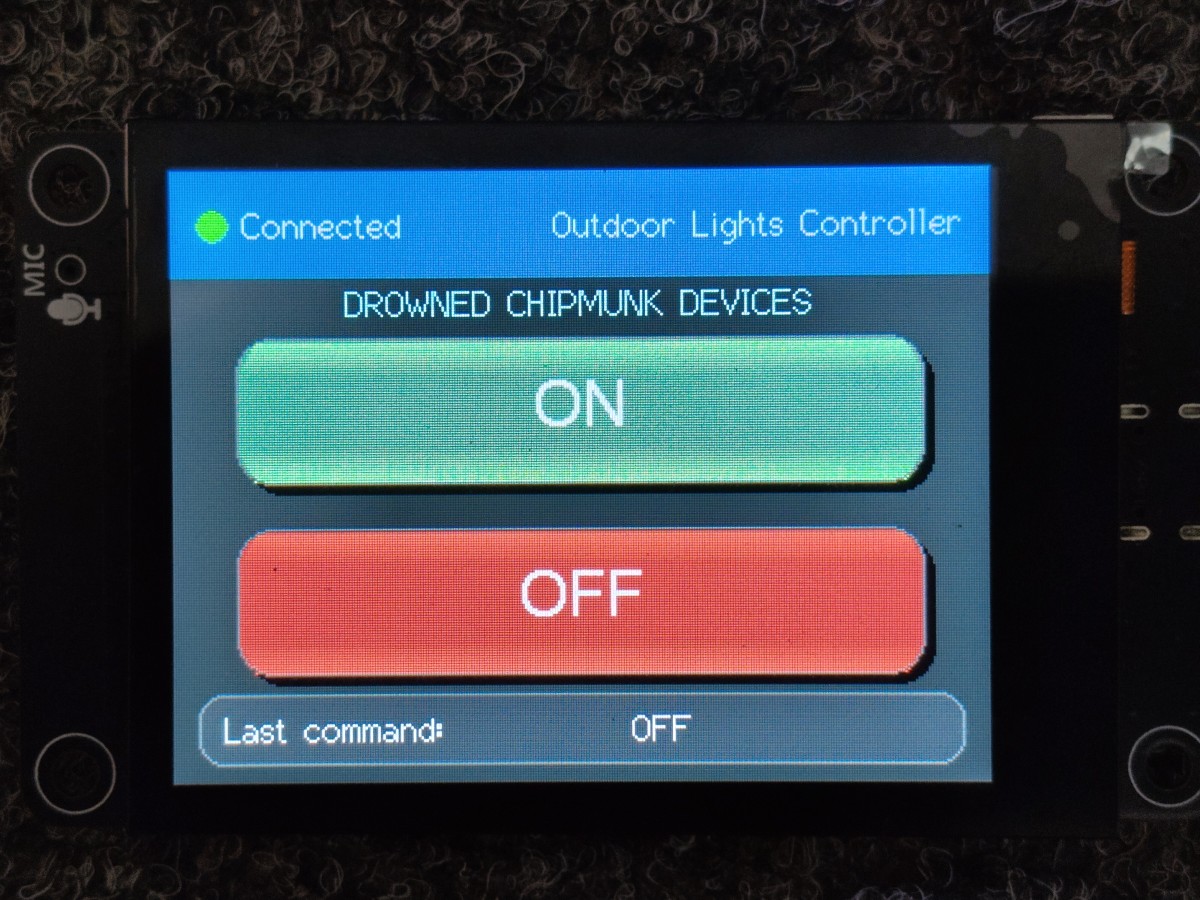
Anyhow, these ~$20 devices are fun to play around with. I’ve got another one coming and now I’m trying to figure out other projects for them. Have you built with one? Any recommendations for project ideas to try or modifications for my porch lights?
For anyone interested, here’s the code I wrote (with a lot of help from other examples) for the CYD:
#include <TFT_eSPI.h>
#include <SPI.h>
#include <Arduino.h>

#include <BLEDevice.h>
#include <BLEUtils.h>
#include <BLEClient.h>
#include <BLEScan.h>

// ================= BLE UUIDs (Nano 33 BLE) =================
#define SERVICE_UUID        "0000180A-0000-1000-8000-00805f9b34fb"
#define CHARACTERISTIC_UUID "00002a57-0000-1000-8000-00805f9b34fb"

// ================= TOUCH (FNK0104B) =================
  #include "FT6336U.h"
  #define I2C_SDA 16
  #define I2C_SCL 15
  #define RST_N_PIN 18
  #define INT_N_PIN 17
  FT6336U ft6336u(I2C_SDA, I2C_SCL, RST_N_PIN, INT_N_PIN);
  FT6336U_TouchPointType tp;

// ================= STYLE =================
  #define COLOR_BG        0x18E3      // charcoal
  #define COLOR_CARD      0x2945      // dark blue-grey
  #define COLOR_HEADER    0x0418      // navy
  #define COLOR_ON        0x3D8E      // modern green
  #define COLOR_OFF       0xD145      // modern red
  #define ON_LIGHT        0x7F30
  #define OFF_LIGHT       0xF2A8
  #define COLOR_BORDER    0x7BEF
  #define COLOR_TEXT      TFT_WHITE
  #define COLOR_ACCENT    TFT_CYAN

// ================= DISPLAY =================
TFT_eSPI tft = TFT_eSPI();

// ================= BLE =================
BLEClient* client;
BLERemoteCharacteristic* characteristic;
bool connected = false;

// ================= BUTTONS =================
struct Button {
  int x, y, w, h;
  uint16_t color;
  const char* label;
};

Button btnOn = {25, 65, 270, 58, COLOR_ON, "ON"};
Button btnOff ={25, 140, 270, 58, COLOR_OFF, "OFF"};

// ---------------- DRAW BUTTON ----------------
void drawButton(Button &b)
{
  uint16_t highlight;
  if(b.label=="ON") highlight = ON_LIGHT;
  else highlight = OFF_LIGHT;

    // Shadow
    tft.fillRoundRect(
        b.x+4,
        b.y+4,
        b.w,
        b.h,
        14,
        TFT_BLACK);

    // Main button
    tft.fillRoundRect(
        b.x,
        b.y,
        b.w,
        b.h,
        14,
        b.color);

    // Top Highlight strip
    fillGradient(   //tft.fillRoundRect(
        b.x+7,
        b.y+2,
        b.w-14,
        14,
        //8,
        highlight,
        b.color,
        1);

    // Bottom Highlight strip
    fillGradient(   //tft.fillRoundRect(
        b.x+7,
        (b.y+b.h-2),
        b.w-14,
        14,
        //8,
        highlight,
        b.color,
        -1);

    tft.drawRoundRect(
        b.x,
        b.y,
        b.w,
        b.h,
        14,
        COLOR_BORDER);

    tft.setTextDatum(MC_DATUM);
    tft.setTextColor(TFT_WHITE,b.color);

    tft.drawString(
        b.label,
        b.x+b.w/2,
        b.y+b.h/2,
        4);
}

void fillGradient(int x, int y, int w, int h, uint16_t c1, uint16_t c2, int upDown)
{
    for (int i = 0; i < h; i++)
    {
        float t = (float)i / (h - 1);

        uint8_t r1 = (c1 >> 11) & 0x1F;
        uint8_t g1 = (c1 >> 5) & 0x3F;
        uint8_t b1 = c1 & 0x1F;

        uint8_t r2 = (c2 >> 11) & 0x1F;
        uint8_t g2 = (c2 >> 5) & 0x3F;
        uint8_t b2 = c2 & 0x1F;

        uint8_t r = r1 + (r2 - r1) * t;
        uint8_t g = g1 + (g2 - g1) * t;
        uint8_t b = b1 + (b2 - b1) * t;

        uint16_t color = (r << 11) | (g << 5) | b;

        tft.drawFastHLine(x - i/2, y + (upDown*i), w +i, color);
    }
}

// ---------------- DRAW STYLES -----------------
void drawHeader()
{
    tft.fillRect(0,0,320,42,COLOR_HEADER);

    tft.fillCircle(
        16,
        21,
        6,
        connected ? TFT_GREEN : TFT_RED);

    tft.setTextDatum(CL_DATUM);

    tft.setTextColor(TFT_WHITE,COLOR_HEADER);

    tft.drawString(
        connected ?
        "Connected" :
        "Disconnected",
        28,
        21,
        2);

    tft.setTextDatum(CR_DATUM);

    tft.drawString(
        "Outdoor Lights Controller",
        310,
        21,
        2);
}

void drawTitle()
{
    tft.setTextDatum(MC_DATUM);

    tft.setTextColor(COLOR_ACCENT,COLOR_BG);

    tft.drawString(
        "DROWNED CHIPMUNK DEVICES",
        160,
        52,
        2);
}

void drawStatus(String text)
{
    tft.fillRoundRect(
        10,
        205,
        300,
        28,
        10,
        COLOR_CARD);

    tft.drawRoundRect(
        10,
        205,
        300,
        28,
        10,
        COLOR_BORDER);

    tft.setTextDatum(CL_DATUM);

    tft.setTextColor(
        TFT_WHITE,
        COLOR_CARD);

    tft.drawString(
        "Last command:",
        20,
        219,
        2);

    tft.drawString(
        text,
        180,
        219,
        2);
}

void pressAnimation(Button &b)
{
    uint16_t old = b.color;

    b.color = TFT_WHITE;

    drawButton(b);

    tft.setTextColor(old,TFT_WHITE);

    tft.drawString(
        b.label,
        b.x+b.w/2,
        b.y+b.h/2,
        4);

    delay(90);

    b.color = old;

    drawButton(b);
}

// ---------------- TOUCH HIT TEST ----------------
bool inside(Button b, int x, int y)
{
  char tempString[128];
  sprintf(tempString, "Button X: %4d to %4d and Touch X: %4d\tButton Y: %4d to %4d and Touch Y: %4d\n", b.x, (b.x+b.w), x, b.y, (b.y+b.h), y);
  Serial.print(tempString);
  return (x > b.x && x < b.x + b.w &&
          y > b.y && y < b.y + b.h);
}

// ---------------- BLE CONNECT ----------------
bool connectNano()
{
  BLEDevice::init("");

  BLEScan* scan = BLEDevice::getScan();
  scan->setActiveScan(true);

  BLEScanResults results = *scan->start(5);

  Serial.println("Scanning...");

  for (int i = 0; i < results.getCount(); i++)
  {
    BLEAdvertisedDevice dev = results.getDevice(i);

    Serial.println(dev.toString().c_str());

    if (dev.haveName() && dev.getName() == "Nano 33 BLE")
    {
      Serial.println("Found Nano 33 BLE");

      client = BLEDevice::createClient();

      if (!client->connect(&dev))
      {
        Serial.println("Connection failed");
        return false;
      }

      BLERemoteService* service =
          client->getService(SERVICE_UUID);

      if (!service)
      {
        Serial.println("Service not found");
        return false;
      }

      characteristic =
          service->getCharacteristic(CHARACTERISTIC_UUID);

      if (!characteristic)
      {
        Serial.println("Characteristic not found");
        return false;
      }

      connected = true;
      Serial.println("BLE Connected!");
      return true;
    }
  }

  Serial.println("Nano not found");
  return false;
}

// ================= SETUP =================
void setup()
{
  Serial.begin(115200);

  // DISPLAY
  tft.init();
  tft.setRotation(1);
  tft.fillScreen(COLOR_BG);
  drawHeader();
  drawTitle();
  drawButton(btnOn);
  drawButton(btnOff);
  drawStatus("Connecting BLE...");

  // TOUCH
  ft6336u.begin();

  // BLE
  connected = connectNano();
  drawHeader();
  if(connected) drawStatus("Connected");
}

void loop()
{

  tp = ft6336u.scan();

  if (tp.tp[0].status==0)
  {

    Serial.print("Raw X=");
    Serial.print(tp.tp[0].x);
    Serial.print(" Raw Y=");
    Serial.println(tp.tp[0].y);

    int x = map(tp.tp[0].y, 9, 310, 0, 320);
    int y = map(tp.tp[0].x, 239, 7, 0, 240);

    if (inside(btnOn,x,y))
    {
        pressAnimation(btnOn);
        characteristic->writeValue(0x01,1);
        drawStatus("ON");
        Serial.println("ON");
        delay(250);
    }

    if (inside(btnOff,x,y))
    {
        pressAnimation(btnOff);
        characteristic->writeValue(0x02,1);
        drawStatus("OFF");
        Serial.println("OFF");
        delay(250);
    }
  }

  delay(5);
}


0 Responses to CYD Control Board Learning